View Transition API: Limitations and Workarounds
The View Transition API handles snapshots and shared elements well. SSGOI keeps geometry, temporary layers, and transition policy in its own engine so complex motion can remain a preset.
The View Transition API captures a page before and after a state change, then connects the two scenes. For a same-document transition, the browser follows roughly this sequence after document.startViewTransition():
capture the old view
        ↓
update the DOM
        ↓
capture the new view
        ↓
animate old/new inside ::view-transition
It can fade the whole page, animate the generated old and new pseudo-elements with CSS or the Web Animations API, and connect two elements that share a view-transition-name. The source and destination images can even have different aspect ratios: explicit object-fit and clipping rules let the author describe the crop change. Cross-document transitions can also add motion to same-origin navigation without converting a multi-page app into an SPA.
There is a lot to like here. The real DOM only needs to contain the new state while the browser keeps the old state as a static capture. If the visual transition is skipped, the DOM update still runs.
This is enough for a wide range of transitions. A one-off transition for a known screen and a reusable preset for many applications have different constraints, however. The examples below ask who measures the geometry, who builds the scene, and who resolves rapid consecutive navigation.
Why I did not use it inside the library
I build SSGOI, a page transition library. Browser compatibility was one reason I initially chose a custom engine. As View Transition support expanded, I reconsidered replacing SSGOI's internals with it. The decision to keep the engine no longer rested on compatibility alone.
I wanted a library where callers would not rewrite transition code for every screen. They choose which effect belongs between two routes, and the library builds the transition from elements that already exist on those screens. Effect-only helper DOM, pseudo-element CSS, and screen-specific measurement code should stay inside the preset.
That required the library to own three kinds of control:
- information: which elements correspond, which part of the media is visible, and how scroll changes the coordinates
- scene: where to create moving copies, intermediate layers, and transition-only decoration, and when to remove them
- policy: which navigations form a pair, which swipe-back or duplicate events to skip, and how to clean up or continue when another navigation arrives mid-transition
Application code can own all three for a known set of screens. A preset should not make every application repeat that effect-specific preparation.
View Transition keeps its captures and generated pseudo-element tree inside the browser. A preset built on it still needs a separate measurement and scene layer for coordinates, crop metadata, and insertion points that the public interface does not expose. Skip, replacement, and cleanup behavior likewise need policy around the API. I therefore kept SSGOI on an engine that works with the real page DOM and the Web Animations API, with information, scene, and policy under the same owner.
Where precise control changes the problem
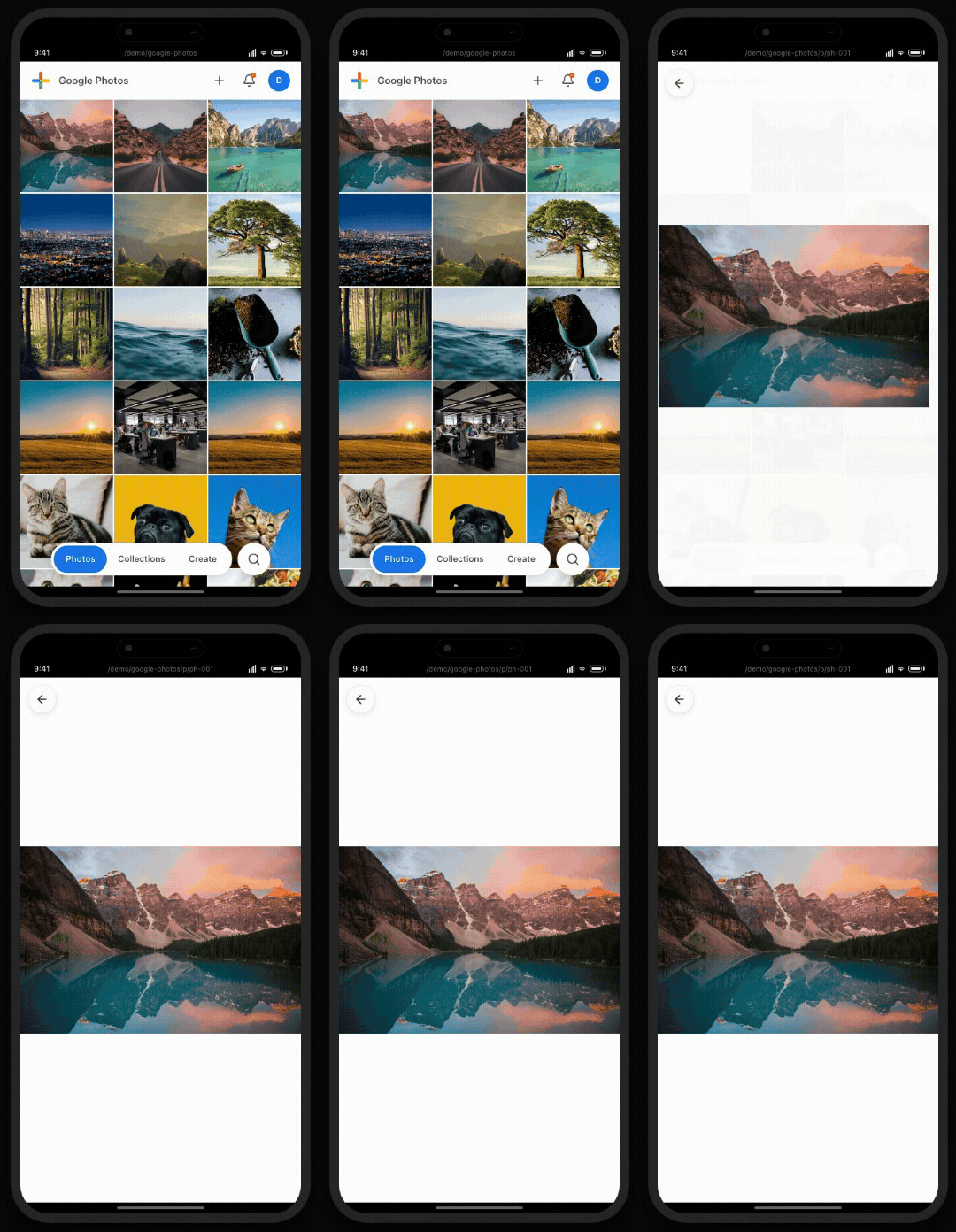
Hero and Zoom are a useful place to start because they look similar at first. Both begin when a user selects an image in a list, but they animate different things.
| Hero — the photo moves | Zoom static — the whole page unfolds |
|---|---|
 |
 |
Hero: https://ssgoi.dev/demo/google-photos
Zoom static: https://ssgoi.dev/demo/instagram/profile/deaseungseung94
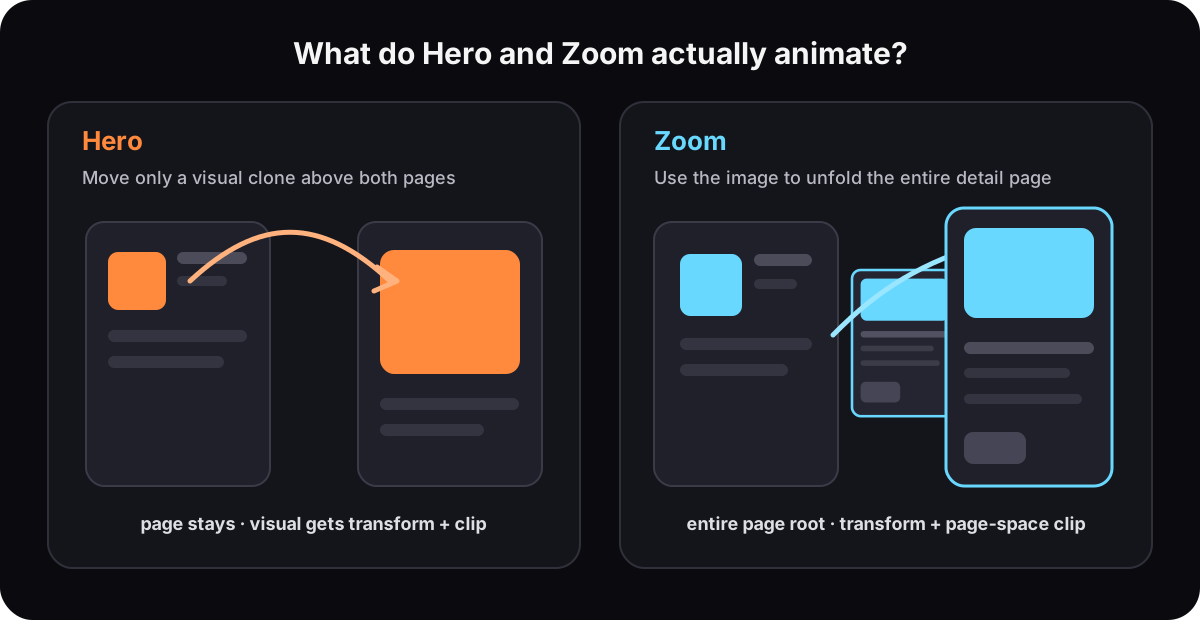
Diagram based on the SSGOI Hero and Zoom implementations, created July 12, 2026.
Hero puts a clone of the selected visual above the two pages and moves that visual to its next position. Zoom does not move only a shared element. It uses the image as an anchor, scales the entire incoming detail page down to the thumbnail, clips it to the card, then releases both the page transform and the clip.
1. Hero: application CSS versus preset inference
A Hero-style shared element transition fits the View Transition model well. Give the old and new images the same view-transition-name; if their aspect ratios differ, style each snapshot with the intended object-fit and clipping.
These GIFs come from an earlier SSGOI Hero implementation that had to connect a cover thumbnail to a contain detail image.
| Hero using only bounding boxes | Hero using a content rect and visible window |
|---|---|
 |
 |
https://ssgoi.dev/blog/shared-element-transitions-object-fit
The first version aligned a cloned image to two border boxes. The corrected version moves the destination clone using the full image content rect and interpolates the source's visible window with clip-path.
In a View Transition implementation, the screen author supplies the fit and crop rules for the old and new snapshots. SSGOI's Hero implementation instead reads the existing <img>, intrinsic ratio, computed object-fit, clipping wrapper, and radius when the structure is safe to interpret, and falls back to border-box geometry when it is not. The Hero preset turns per-screen crop rules into common behavior.
2. Zoom transforms the entire page, not a shared element
SSGOI's Zoom implementation reuses the same media geometry resolver, but for a different purpose. On entry it animates the incoming detail page root; on exit it animates the outgoing detail page root. It does not create an image clone.
To construct the first frame of an entry transition, the engine:
- Calculates the X and Y scales and position that align the detail image's content rect with the thumbnail's content rect.
- Inverse-projects the thumbnail's visible window into the detail image coordinate system.
- Converts that window into a
clip-path: inset()expressed against the entire detail page. - Applies the calculated transform and clip to the detail page root, then animates both back to the page's normal state.
Scroll differences and border radius also enter the calculation. Because the page can use non-uniform scale, SSGOI compensates the X and Y radii separately so the visible corner size remains stable. If the media geometry is ambiguous or the projected crop would require impossible pixels, it falls back to the two border boxes.
The image coordinates therefore do not exist merely to move one shared element. They answer a different question: how small should the entire detail page become, and how much of it should remain visible, for the page to appear to start inside this thumbnail?
Zoom types also treat the page behind it differently.
| Zoom expand | Zoom blur + fade |
|---|---|
 |
 |
Zoom expand: https://ssgoi.dev/demo/pinterest
Zoom blur: https://ssgoi.dev/demo/air-bnb
static leaves the background page in place. expand enlarges and moves the background page toward the selected card while the detail page opens. blur scales the background down to 0.88 and places a separate backdrop layer between the two pages. The optional fade variant walks the ancestor path around the focus element and fades the surrounding sibling branches independently.
A basic shared-element declaration is not enough to produce this Zoom. object-fit only helps interpret the anchor image's crop. The engine still has to project the thumbnail window into the detail image, convert it into a page-wide clip, and coordinate the background page, surrounding branches, and optional backdrop.
View Transition can play the final transform and clip keyframes on the root capture or another named snapshot. In a same-document application, code can save the thumbnail content rect, visible window, and scroll before the DOM update, measure the new detail page afterward, and derive those keyframes.
On top of View Transition, the flow looks roughly like this. A production implementation would also handle framework-specific updates and failure paths.
const source = measureThumbnail();

const transition = document.startViewTransition(() => {
  renderDetailPage();
});

await transition.ready;

const target = measureDetailPage();
const keyframes = projectPageIntoThumbnail({ source, target });

document.documentElement.animate(keyframes, {
  pseudoElement: "::view-transition-new(root)",
});
View Transition handles capture and playback of the final keyframes. The information layer inside measureThumbnail(), measureDetailPage(), and projectPageIntoThumbnail() resolves media crop, the visible window, page-space clip, scroll, and radius. A separate scene step prepares the background keyframes and optional backdrop.
That measurement and coordinate conversion live outside the API. The public ViewTransition object does not return the old and new capture rectangles, transforms, media content rects, visible windows, ancestor clip chain, or scroll relationship. A cross-document transition cannot even read the previous document's DOM, so the old page must transfer any required metadata separately.
The boundary is calculation responsibility. An application can measure its known screens and play the finished keyframes on the generated pseudo-elements. A reusable Zoom preset has to own measurement, coordinate projection, and page clipping, so a View Transition-based library would still need that layer outside the API.
3. Film creates visual pieces during the transition
Film moves more than two page captures.

The pages scale down, swap vertically, and scale back up. Viewfinder-like lines appear at the four corners. SSGOI's Film implementation creates four outer nodes and eight inner lines for that frame: twelve temporary DOM elements in total.
The motion does not use one easing curve either:
- a scale-down spring starts first
- a translation spring joins after the scale has progressed
- a scale-up spring starts as the translation approaches its end
Both pages in the Lumen demo also play background video. SSGOI moves the real outgoing page, so its video keeps playing during the transition. A View Transition old image is a static capture; the previous video freezes at the captured frame.
In an application-specific implementation, the corner frame can use a CSS background or mask, or helper elements prepared and named before the new capture. Both approaches put effect-specific scene preparation in application code. After ready, the generated pseudo tree exposes no insertion point for live DOM.
Blind transitions meet the same boundary. A splash between two predefined screens can rely on structure prepared by the application. A reusable effect that derives blades, rays, particles, or mask fragments from click, viewport, and application data must either require that structure from the application or own its visual layer.
4. Blur needs a layer between the pages
For Sheet blur, the implementation burden lies in the position and lifetime of the backdrop layer rather than in the backdrop-filter syntax.
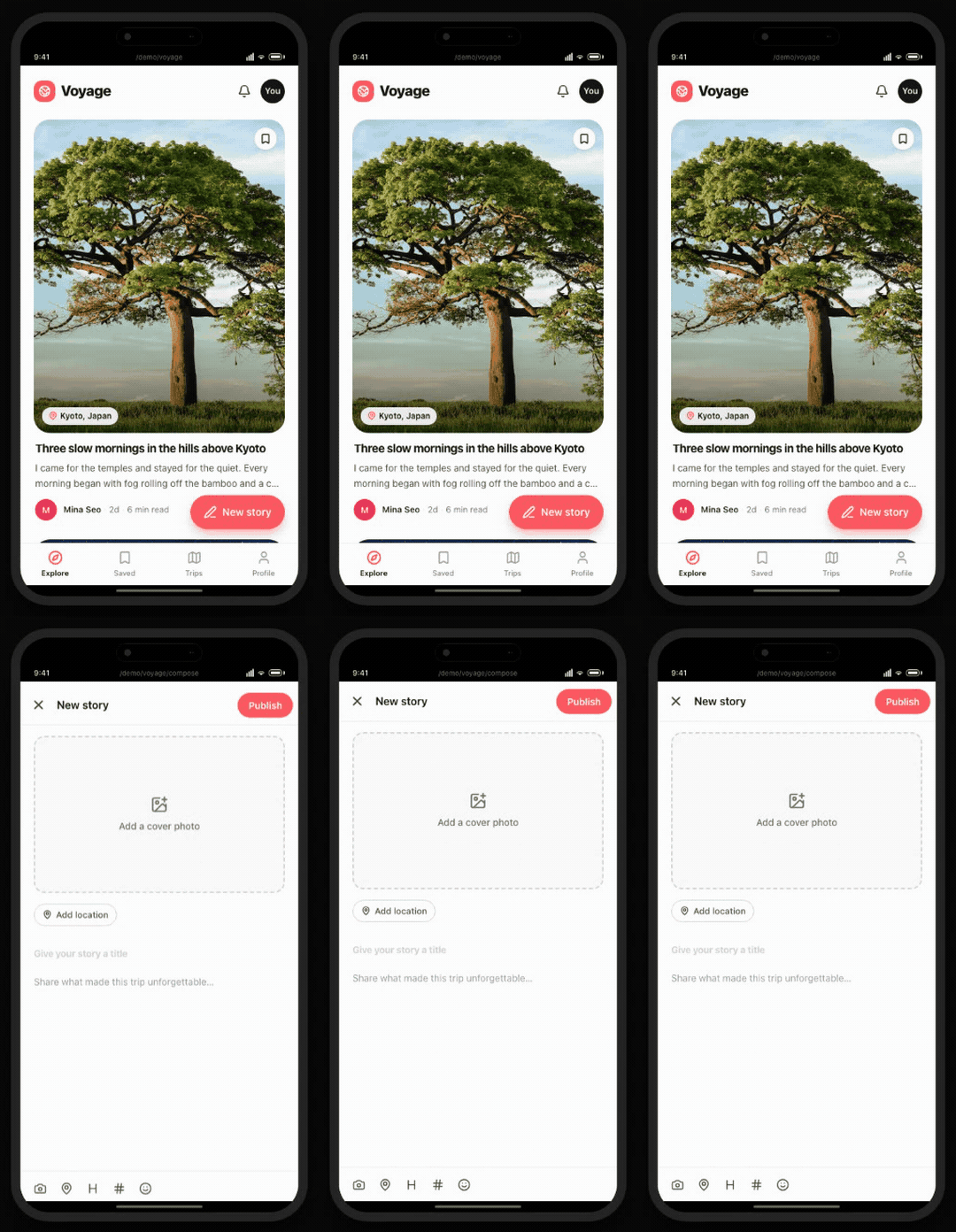
Sheet blur scales the background page down slightly and places a compose page above it. The blur is not applied directly to either page. SSGOI inserts a separate backdrop node between them so the halo remains independent of the background scale and clip.
Zoom blur uses the same arrangement: background page, live backdrop, detail page.
An application-specific implementation can design helper DOM and named-group ordering before capture. A general-purpose preset built on View Transition must either require that effect-specific markup and capture order from the application or own a separate scene layer. The generated group → image-pair → old/new tree exposes no runtime insertion point for another layer.
SSGOI owns the transition scene, so it can create the backdrop at the required stack level, size it against the live viewport and scroll position, and remove it when the transition completes. Callers select zoom({ type: "blur" }) or sheet({ type: "blur" }) without adding effect-specific helper markup.
Classifying the limits by control
These examples become clearer when grouped by the information, scene, and policy a reusable preset has to own.
| Control the preset needs | Example | What remains outside View Transition |
|---|---|---|
| Information — geometry and meaning outside the capture | Detail-page transform, clip, and scroll for Zoom | The application or library measures both DOM states and transfers metadata |
| Scene — visual pieces decided at runtime | Film corners, Blind blades, dynamic splash particles | Prepare helpers before capture or use a separate scene layer |
| Scene — a layer between old and new | Zoom blur and Sheet blur | Design named groups and helper stacking in advance |
| Scene — a continuously moving outgoing view | Video in Film, canvas, or live visualization | Use real DOM or another live renderer instead of a static old capture |
| Policy — coordinated lifetime and cleanup | Film's three springs; Zoom's page, crop, and background | Own measurement, playback, cancellation, and cleanup as one flow |
| Policy — transition selection and replacement | Swipe-back skips, rapid navigation, duplicate mount/hide, and mid-transition navigation | Define pairing, skip, queue, pose handoff, and cleanup rules |
Geometry measurement, prepared helpers, and named groups are available when application code also owns the DOM structure and metadata.
The old capture is static, and the pseudo tree is fixed after ready. Continuously updating video or canvas and runtime-created live DOM therefore have to remain in real DOM or a separate live layer.
The central limit appears when these effects have to become reusable presets: the public interface leaves the preset responsible for missing geometry, metadata transfer, scene ownership, and transition policy.
Workarounds with the current API
Applications can work around several limits today, but the responsibility moves into application code.
| Requirement | Current workaround | Remaining boundary |
|---|---|---|
| Old/new geometry and crop | Measure the DOM before and after the update; pass values through CSS variables or WAAPI keyframes | ViewTransition still exposes no capture metadata |
| Previous-page data in a cross-document transition | Pass the required values through storage or navigation metadata | The new document cannot inspect the previous DOM or its computed styles |
| Transition fragments or a backdrop | Create helpers before the new capture and design the named-group order | Nothing can be inserted into the fixed pseudo tree after ready |
| Live outgoing video or canvas | Keep it outside the transition capture or render it in a separate live layer | ::view-transition-old() remains a static image |
| Navigation changes during a transition | Let application code own navigation queue/skip behavior and spring scheduling | The active transition on the same root is skipped, with no built-in handoff of current pose, velocity, or completion reason |
An application with known screens can keep these workarounds in screen code. A reusable preset needs its own measurement and scene layer plus transition policy.
Interfaces that would open more transitions
The View Transition API continues to evolve. Nested groups and element-scoped transitions already address parts of the original flat-tree and whole-document limitations. Additional interfaces could move more of the examples above into the browser-managed layer.
| Additional interface | What it would enable |
|---|---|
| Per-name old/new rect, transform, clip, and scroll metadata | Reusable Zoom without remeasuring both DOM states |
| Rendered-media content rect and visible window | Page-clip and automatic crop rules without re-deriving DOM/CSS geometry |
| An author overlay or insertion point in the pseudo tree | Film corners, Blind blades, dynamic splash fragments, and intermediate backdrops |
| A security-aware snapshot handle | Canvas or WebGL effects that divide a capture into multiple pieces |
| A live outgoing-element layer | Old video and canvas that keep updating during the transition |
| A completion reason plus current pose and velocity | Natural continuation when navigation changes mid-transition |
Until browsers expose those capabilities, reusable presets have to own the missing measurement and scene control outside the browser-managed capture layer. The dependency is on a future interface, not merely broader compatibility for the current one.
The approach SSGOI chose
I did not build SSGOI as a CSS wrapper around View Transition. It is a transition engine that measures and animates the real page DOM with the Web Animations API.
That lets Zoom calculate the page and crop together, Film compose temporary DOM and multiple springs into one scene, and blur transitions own the backdrop between two pages. Applications do not prepare helper markup or capture ordering for each effect.
After seeing what Zoom blur does, its public configuration is easier to read:
const config: SsgoiConfig = {
  transitions: [
    {
      from: "/photos",
      to: "/photos/*",
      transition: zoom({ type: "blur", variant: "fade" }),
    },
  ],
};
The list and detail screens mark the two existing elements that represent the same item:
<img data-zoom-exit-key={photo.id} ... />
<img data-zoom-enter-key={photo.id} ... />
Those markers provide the geometric anchors. When the media structure is unambiguous, the preset also reads its visible crop; otherwise it falls back to the border boxes.
Policy lives in the same engine. SSGOI pairs outgoing and incoming route events, cancels an incomplete pair when a new path arrives, skips animation for swipe-back, and deduplicates repeated React hide/reveal events. It also owns cleanup for the clones and backdrops created by a transition.
When another animation arrives mid-flight, HostAnimation reads the previous pose, completes its cleanup, calls next.matchInto(pose), and carries the playback rate plus play, pause, or reverse state. If the next target is a single animation on the same real element, it applies both value and velocity as its initial state.
Retargeting every animation inside a composite preset is not complete yet. Because SSGOI owns the information, scene, and policy layer, that behavior can evolve in library code instead of waiting for another browser interface.
Callers see one zoom(...) declaration and two markers. Behind that surface, crop, scroll, backdrop, cleanup, skip, and replacement policy add up to the interaction. Keeping those details inside the preset instead of rebuilding them for every screen is why I did not choose the View Transition API as SSGOI's internal engine.
You can try Zoom, Hero, Film, and Sheet on ssgoi.dev, or inspect the SSGOI source on GitHub.
Demo GIFs were recorded from SSGOI demos on July 12, 2026. Demo media licensing: Unsplash, Lorem Picsum, and Pexels.