
Persistent layouts
Keep a bottom nav or header still while the pages under it change.
The quick start uses the pathname as both the React key and the transition id, so every navigation replaces the whole page. Keep that version until part of the routed UI has to survive a navigation — then split the page into the few lifetimes the product actually needs.
Keep a bottom nav still while tabs change
Say /, /collections and /create are tab pages sharing one bottom nav, and /photo/[id] is a detail page without it. Tab → tab should move only the content. Tab → detail should send the whole shell away, nav included.
With key={pathname} at the root, React remounts everything on every navigation, so the nav animates on tab → tab too.
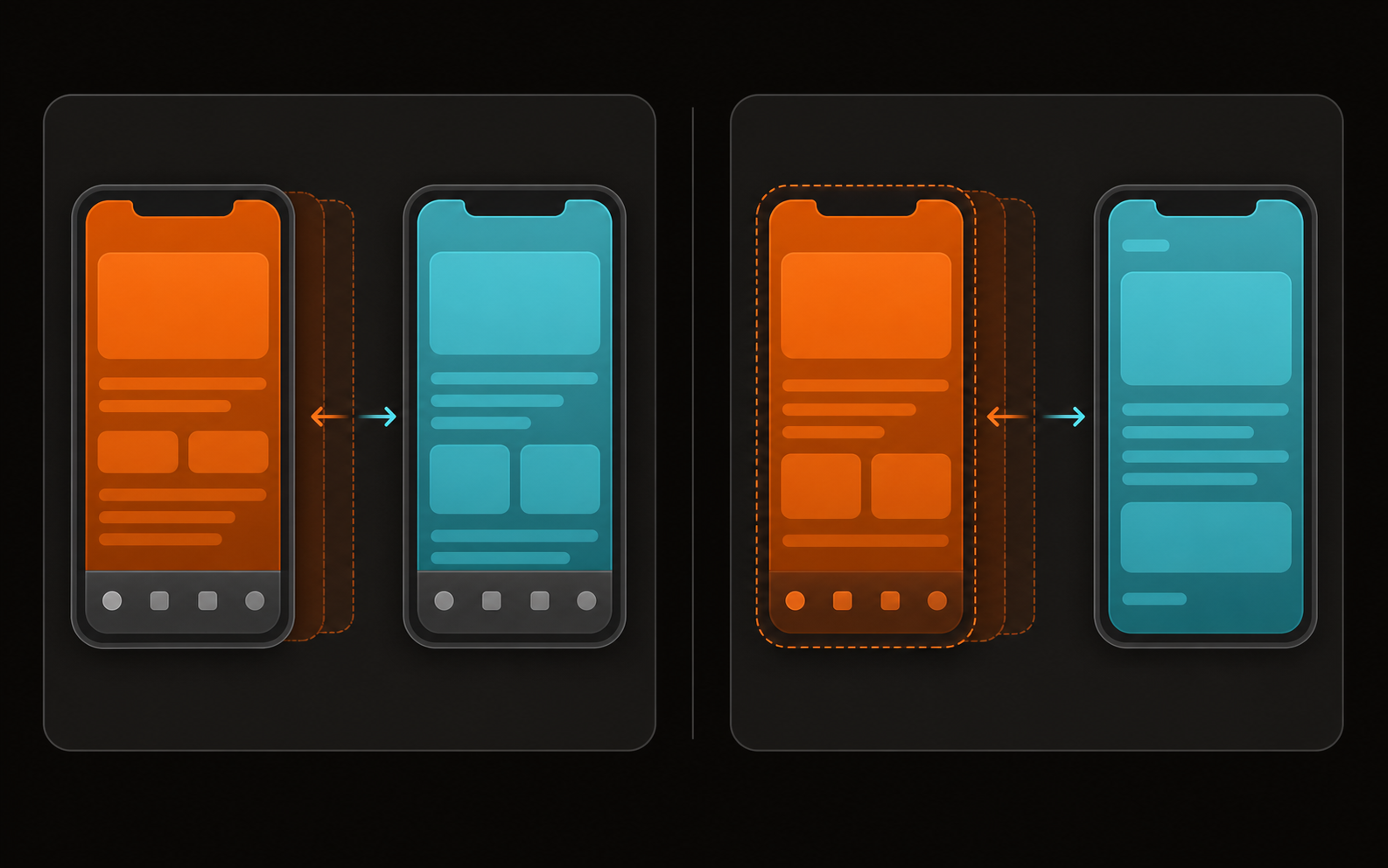
Change the key to animate, keep the attribute truthful
A boundary carries two values, and only one of them starts anything. The React key decides whether the DOM node is destroyed and recreated, and SSGOI reacts to the framework destroying and rebuilding the routed node. data-ssgoi-transition is the route id used to pair the leaving page with the arriving one and to match your config rules.
One provider, two nested boundaries
<Ssgoi config={config}>                         one provider
└─ app-shell boundary                              outer lifetime
   ├─ top-level layout
   │  ├─ main-content boundary                     inner lifetime
   │  │  └─ active tab page
   │  ├─ BottomNav                                 outside inner, inside outer
   │  └─ @modal                                    parallel sibling
   └─ detail or project layout

tab → tab       : app-shell key stays · main-content key changes · nav stays
tab → detail    : app-shell key changes · the whole top-level shell leaves
detail → tab    : app-shell key changes · the shell re-enters with the nav
When a parent and a child boundary leave in the same DOM mutation, the outer one owns the transition and the child is cleaned up silently. There is nothing else it could do: the node the framework detached is the outer one, and the child went with it, so no separate node is left to animate. Arrivals resolve the same way — inside one mount batch only the outermost boundary plays an entrance.
The child therefore owns the motion only while its parent stays mounted, and that is what lets one nesting serve both tab and detail navigation.
Resolve the route the slot owns
usePathname() is usually enough. During a soft intercepted modal it is not: the URL becomes /p/42 while the background children slot still renders /projects. Derive the background boundary's id and key from useSelectedLayoutSegments(), as supplied to the adapter’s resolve callback. For nested layouts, pass the owning layout’s base path to selectedSegmentsToPath.
The adapter reads the hooks and supplies Suspense. Use a stable routeKey when a layout owns the shell, or define one resolve policy that returns its logical id and lifetime key. Function props belong in a client component. The complete pattern is linked below.
import {
  SsgoiRouteBoundary,
  selectedSegmentsToPath,
} from "@ssgoi/react/nextjs";

<SsgoiRouteBoundary
  resolve={({ selectedSegments }) => ({
    id: selectedSegmentsToPath(selectedSegments),
    key: selectedSegments.includes("(top-level)")
      ? "app-shell"
      : selectedSegmentsToPath(selectedSegments),
  })}
>
  {children}
</SsgoiRouteBoundary>
Interception and middleware / proxy
The boundary controls DOM lifetime. Your app still owns intercepting route files, parallel slot fallbacks, and any redirects or rewrites in middleware.ts (Next 13–15) or proxy.ts (Next 16+). Review those rules for soft navigation and direct entry, preserve Next’s request headers, and test open, close/back, and reload with that configuration enabled. Ordinary navigation needs no extra middleware. This is separate from SSGOI’s animation middleware. See the agent guide for the short checklist.
A production tree
Comwit runs this on a Next.js App Router tree with tabs, full-page details, a persistent project workspace and intercepted modals. Route groups and parallel slots decide which layouts stay mounted; one provider observes them all.
app/
└─ (app)/
   ├─ layout.tsx                         # one provider + outer app-shell
   ├─ (top-level)/
   │  ├─ layout.tsx                      # inner main-content + BottomNav + @modal
   │  ├─ projects/page.tsx               # /projects
   │  ├─ showcase/page.tsx               # /showcase
   │  ├─ comwit-log/page.tsx             # /comwit-log
   │  ├─ profile/page.tsx                # /profile
   │  └─ @modal/
   │     ├─ default.tsx                  # no modal
   │     └─ (.)p/[id]/page.tsx           # soft /p/42 over the current tab
   └─ (detail)/
      ├─ p/[id]/page.tsx                 # direct /p/42, full page
      └─ projects/[id]/
         ├─ layout.tsx                   # persistent project header + tabs
         ├─ page.tsx                     # /projects/acme
         ├─ members/page.tsx
         ├─ board/
         │  ├─ layout.tsx
         │  └─ @taskSidebar/...          # parallel task panel
         └─ docs/
            ├─ layout.tsx
            ├─ [docId]/page.tsx
            └─ @docSidebar/...          # parallel document panel
Large tree, small ownership: one provider, one outer boundary, one inner boundary for top-level content.
Everything under /projects/acme shares the outer key /projects/acme, so the project header and its loaded state survive while the id keeps following the full route. The immediate project child is left unmarked on purpose — overview → docs is a child swap, not a page transition.
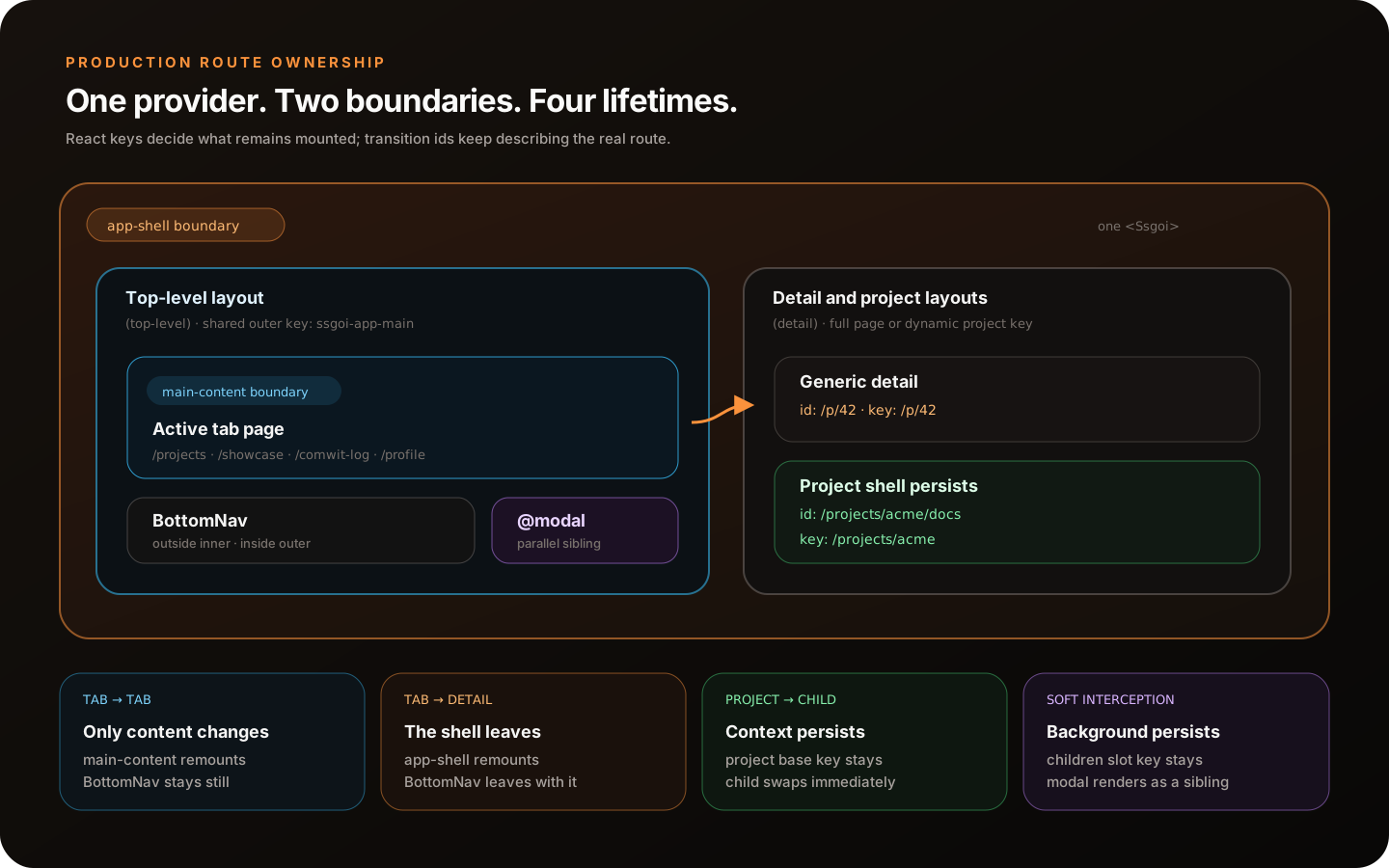
Read each row as one lifetime decision. The id stays truthful; the key is shared only for the UI that should persist.
| Case | Browser URL | children slot | Shell id / key | Result |
|---|---|---|---|---|
| Top-level tab | /projects | (top-level), projects | /projects / ssgoi-app-main | Outer shell persists; the inner tab key owns the motion. |
| Generic detail | /p/42 | (detail), p, 42 | /p/42 / /p/42 | Outer key changes; the tab shell and nav leave together. |
| Same-project child | /projects/acme/docs | (detail), projects, acme, docs | /projects/acme/docs / /projects/acme | Project shell persists; its child swaps immediately. |
| Soft intercepted modal | /p/42 | (top-level), projects | /projects / ssgoi-app-main | Background stays mounted; the modal renders above it. |
When it goes wrong
Every symptom below is the wrong lifetime, not a wrong transition.
- BottomNav moves on tab → tab. It is inside the inner boundary, or the outer boundary is keyed to the raw pathname.
- BottomNav stays on a detail page. It sits outside the outer boundary. Move it inside the one that changes when you leave the tab group.
- Opening a modal animates the background. The background was keyed from
usePathname(). Key it from thechildrenslot instead. - Route rules stop matching once keys are shared. The shared key leaked into the id. Keep
ssgoi-app-mainas a React key only; the attribute stays the real route. - Project tabs replay the full page. A changing boundary wraps the project child, or the shell key uses the full pathname instead of the project base path.
Rules that generalize
- One provider per navigation surface. Nested lifetimes need nested boundaries, not nested providers.
- Reuse a key only while that exact shell should stay mounted; return a different key the moment navigation leaves it.
- Keep the id equal to the route the boundary owns, even when several routes share one key.
- Resolve name → key in one place rather than repeating pathname tests across layouts.
A copy-ready resolver, layouts and checklist live in /llms/complex-routing.txt. For a smaller working example, see the Google Photos demo or the Next.js template.